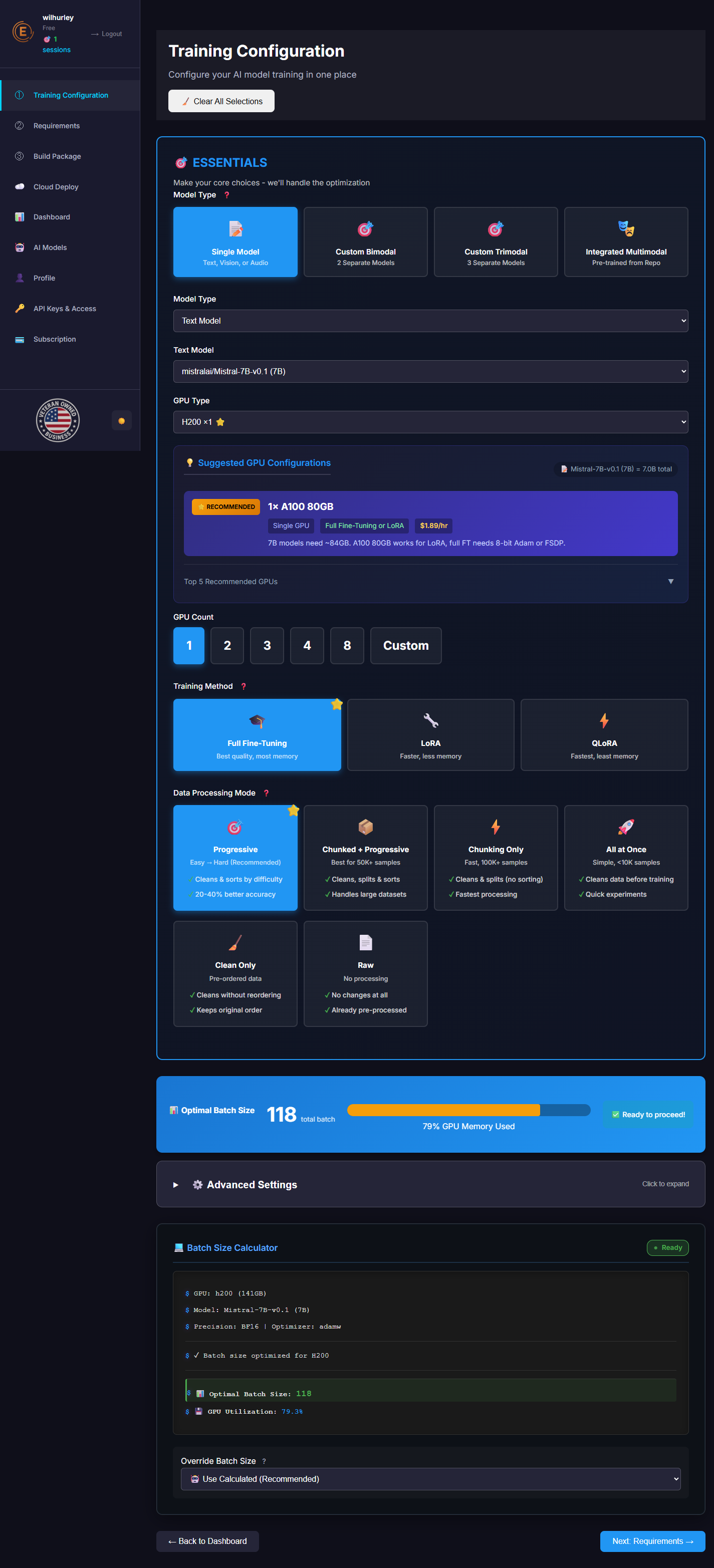
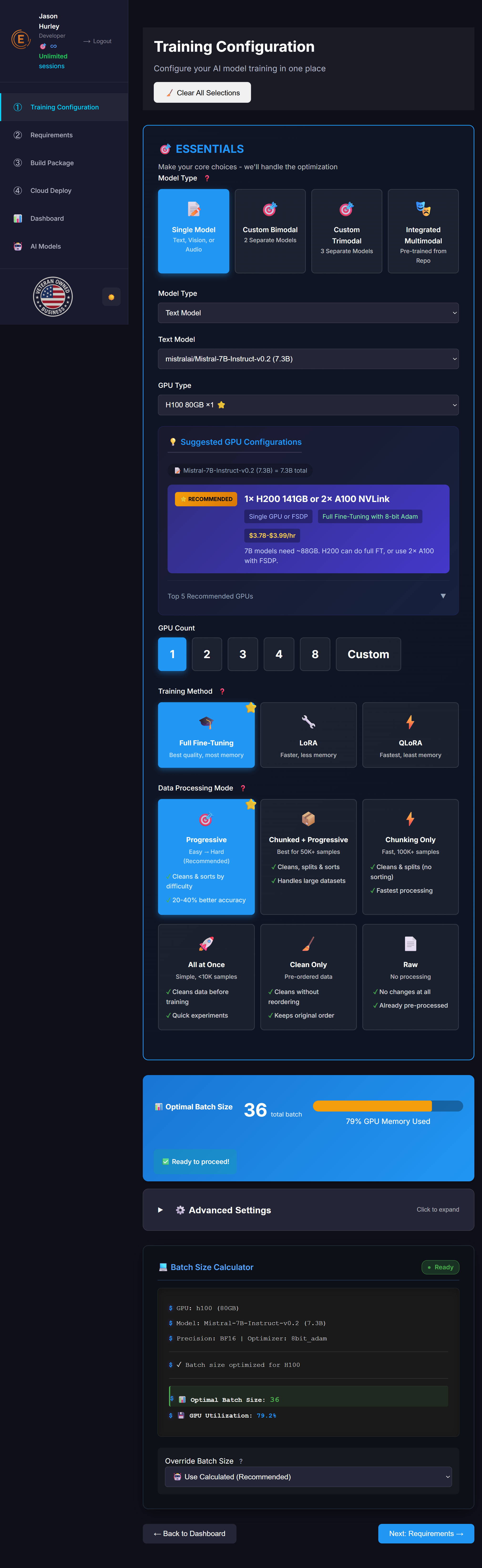
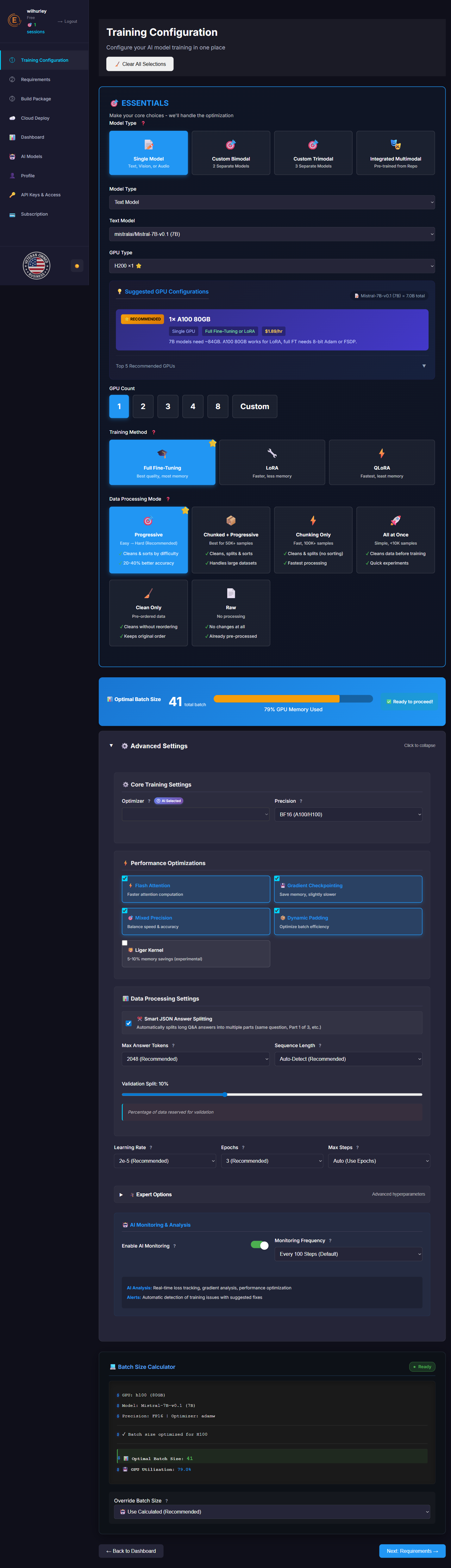
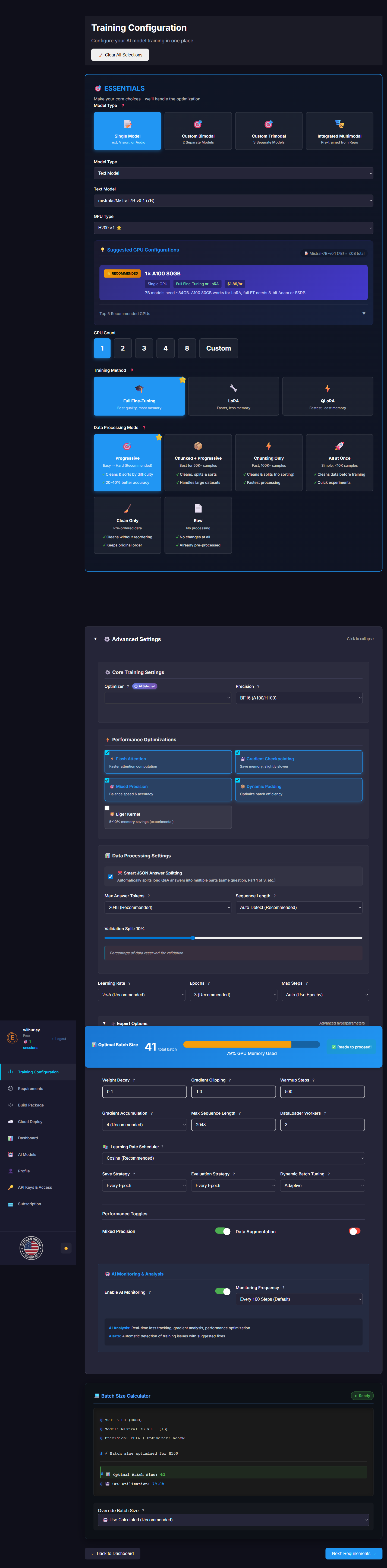
Training Configuration

Configure your AI model training in one place

๐ŸŽฏ ESSENTIALS

Make your core choices - we'll handle the optimization

๐Ÿ“Š Optimal Batch Size

-- total batch
0% GPU Memory Used
โœ… Ready to proceed!

๐Ÿ’ป Batch Size Calculator

Ready
$ GPU: --
$ Model: --
$ Precision: FP16 | Optimizer: AdamW
$ Calculating optimal batch size...
$ ๐Ÿ“Š Optimal Batch Size: --
$ ๐Ÿ’พ GPU Utilization: --

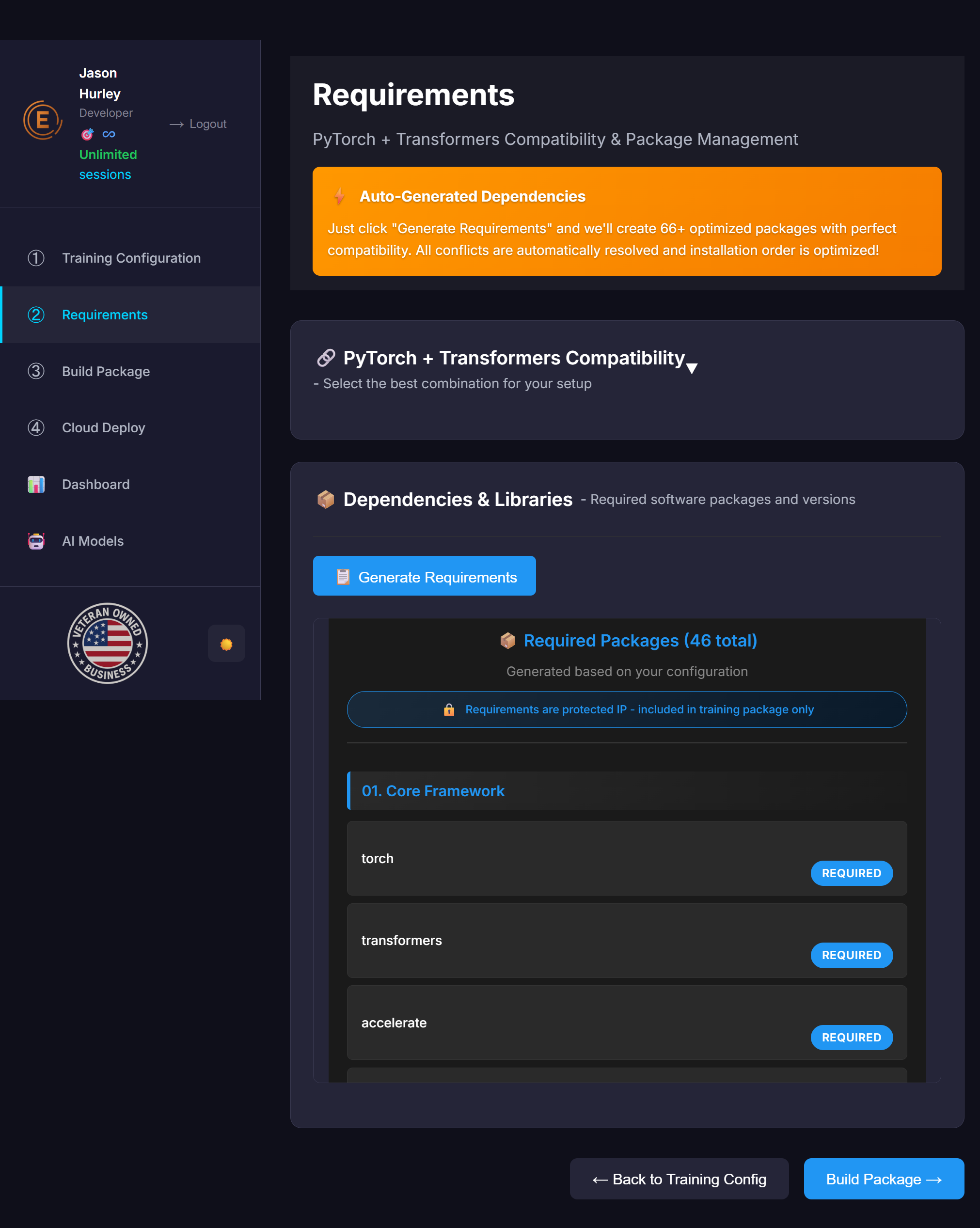
Requirements

PyTorch + Transformers Compatibility & Package Management

โšก Auto-Generated Dependencies

Just click "Generate Requirements" and we'll create 66+ optimized packages with perfect compatibility. All conflicts are automatically resolved and installation order is optimized!

๐Ÿ”— PyTorch + Transformers Compatibility

Select the best combination for your setup

โ–ผ

๐Ÿ“ฆ Dependencies & Libraries

Required software packages and versions

Click "Generate Requirements" to create your dependency list.

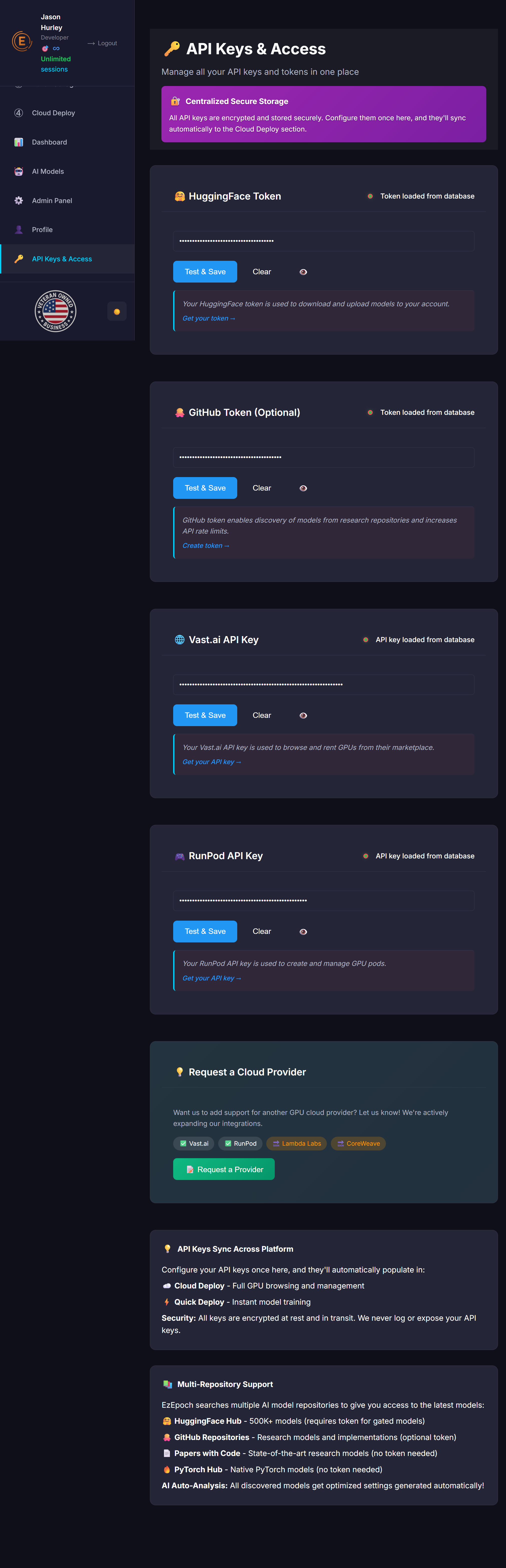
๐Ÿ”‘ API Keys & Access

Manage all your API keys, tokens, and SSH access in one place

๐Ÿ” Centralized Secure Storage

All API keys are encrypted and stored securely. Configure them once here, and they'll sync automatically to the Wizard and Cloud Deploy sections.

๐Ÿค— HuggingFace Token

Not configured

Your HuggingFace token is used to download and upload models to your account.

Get your token โ†’

๐Ÿ™ GitHub Token (Optional)

Not configured

GitHub token enables discovery of models from research repositories and increases API rate limits.

Create token โ†’

๐ŸŒ Vast.ai API Key

Not configured

Your Vast.ai API key is used to browse and rent GPUs from their marketplace.

Get your API key โ†’

๐ŸŽฎ RunPod API Key

Not configured

Your RunPod API key is used to create and manage GPU pods.

Get your API key โ†’

๐Ÿ” SSH Public Key

Not configured

Your SSH public key enables secure, passwordless access to your cloud GPU instances.

๐Ÿ“š How to get your SSH public key โ†’

โš ๏ธ IMPORTANT: Copy the PUBLIC key (.pub file), NOT the private key!

1๏ธโƒฃ Generate a new SSH key (if you don't have one):

ssh-keygen -t rsa -b 4096

Press Enter 3 times (accept defaults, no passphrase needed for cloud GPUs)

2๏ธโƒฃ Display your PUBLIC key:

Windows (PowerShell/CMD):

type %USERPROFILE%\.ssh\id_rsa.pub

Mac/Linux:

cat ~/.ssh/id_rsa.pub

3๏ธโƒฃ Your key should look like this:

ssh-rsa AAAAB3NzaC1yc2EAAAADAQABAAACAQ... jason@jasons-laptop

โœ… Copy the ENTIRE line (including the comment at the end)

4๏ธโƒฃ Add your SSH key to cloud providers:

โš ๏ธ You must add your SSH key to both providers before deploying!

๐Ÿ–ฅ๏ธ Custom SSH Servers

Add your own GPU servers (local machines, AWS, GCP, etc.) for training. These will appear in the GPU list under "My Custom SSH".

๐Ÿ’ก

API Keys Sync Across Platform

Configure your API keys once here, and they'll automatically populate in:

  • ๐Ÿง™ Setup Wizard - Quick 3-step deployment
  • โ˜๏ธ Cloud Deploy - Full GPU browsing and management
  • โšก Quick Deploy - Instant model training

Security: All keys are encrypted at rest and in transit. We never log or expose your API keys.

๐Ÿ“š

Multi-Repository Support

EzEpoch searches multiple AI model repositories to give you access to the latest models:

  • ๐Ÿค— HuggingFace Hub - 500K+ models (requires token for gated models)
  • ๐Ÿ™ GitHub Repositories - Research models and implementations (optional token)
  • ๐Ÿ“„ Papers with Code - State-of-the-art research models (no token needed)
  • ๐Ÿ”ฅ PyTorch Hub - Native PyTorch models (no token needed)

AI Auto-Analysis: All discovered models get optimized settings generated automatically!

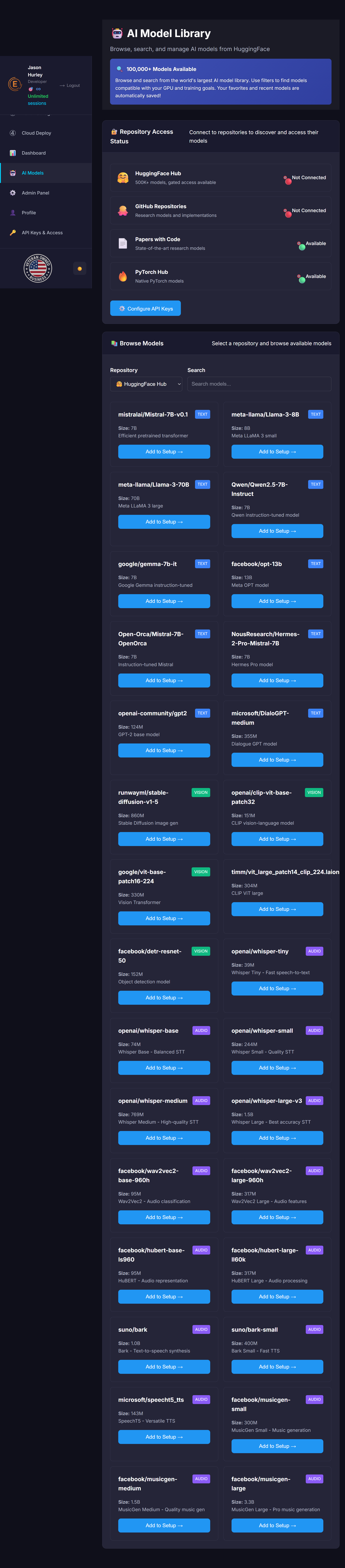
๐Ÿค– AI Model Library

Browse, search, and manage AI models from HuggingFace

๐Ÿ” 100,000+ Models Available

Browse and search from the world's largest AI model library. Use filters to find models compatible with your GPU and training goals. Your favorites and recent models are automatically saved!

๐Ÿ” Repository Access Status

Connect to repositories to discover and access their models

๐Ÿค—

HuggingFace Hub

500K+ models, gated access available

๐Ÿ”ด Not Connected
๐Ÿ™

GitHub Repositories

Research models and implementations

๐Ÿ”ด Not Connected
๐Ÿ“„

Papers with Code

State-of-the-art research models

๐ŸŸข Available
๐Ÿ”ฅ

PyTorch Hub

Native PyTorch models

๐ŸŸข Available

๐Ÿ“š Browse Models

Select a repository and browse available models

Select a repository to view available models...

๐Ÿ‘ค User Profile

Manage your account information and preferences

๐Ÿ” Account Security

Update your profile information, manage your subscription, and configure notification preferences. All changes are saved automatically.

๐Ÿ“ Personal Information

๐Ÿ“ž Contact Information

๐Ÿค– AI Monitoring Preferences

๐Ÿ” API Hash & Sessions

This hash links your training sessions to your account

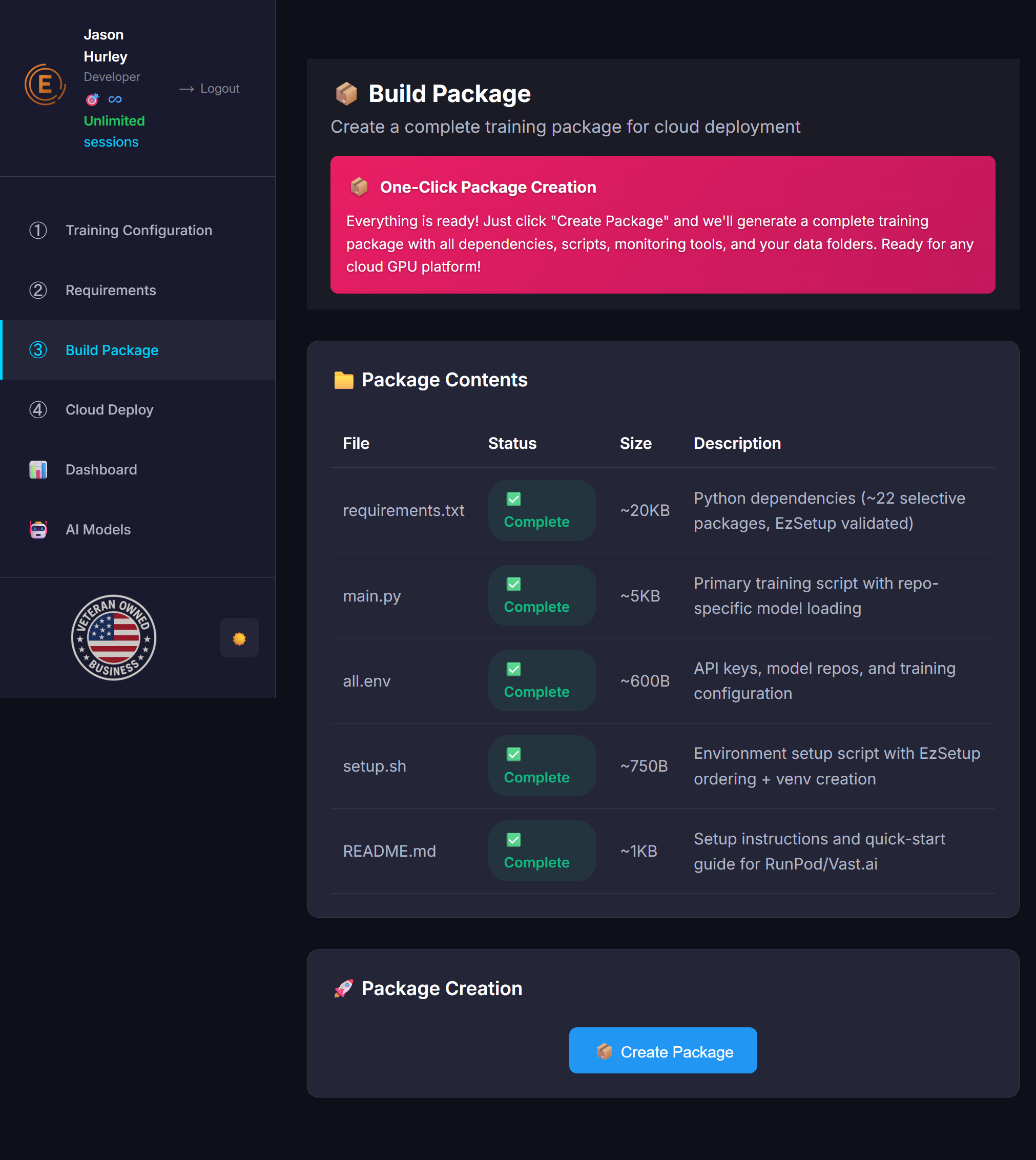
๐Ÿ“ฆ Build Package

Create a complete training package for cloud deployment

๐Ÿ“ฆ One-Click Package Creation

Everything is ready! Just click "Create Package" and we'll generate a complete training package with all dependencies, scripts, monitoring tools, and your data folders. Ready for any cloud GPU platform!

๐Ÿ“ Package Contents

File Status Size Description
requirements.txt โณ Pending ~20KB Python dependencies (~22 selective packages, EzSetup validated)
main.py โœ… Complete ~5KB Primary training script with repo-specific model loading
all.env โœ… Complete ~600B API keys, model repos, and training configuration
setup.sh โœ… Complete ~750B Environment setup script with EzSetup ordering + venv creation
README.md โœ… Complete ~1KB Setup instructions and quick-start guide for RunPod/Vast.ai

๐Ÿš€ Package Creation

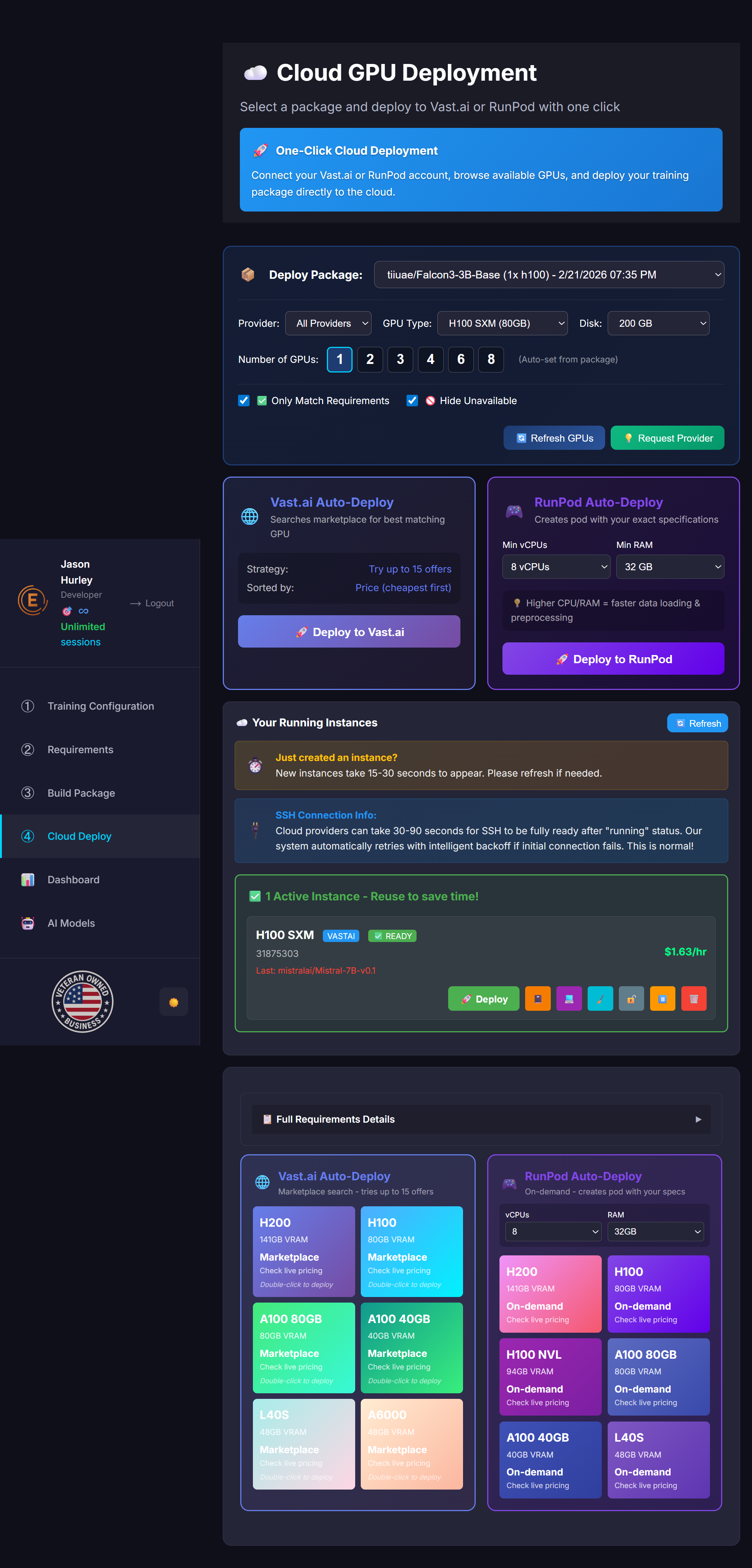
โ˜๏ธ Cloud GPU Deployment

Select a package and deploy to Vast.ai or RunPod with one click

๐Ÿš€ One-Click Cloud Deployment

Connect your Vast.ai or RunPod account, browse available GPUs, and deploy your training package directly to the cloud.

๐Ÿ“ฆ
(Auto-set from package)
๐Ÿ”ฌ

GPU Calibration Test

Measure real memory savings from GCP, Flash Attention, and optimizers

Tests: Baseline (no optimizers) โ†’ GCP only โ†’ Flash Attention only โ†’ GCP + FA โ†’ 8-bit Adam
Results are saved to improve batch size calculations for this model family + GPU combination.
๐ŸŒ

Vast.ai Auto-Deploy

Searches marketplace for best matching GPU

Strategy: Try up to 15 offers
Sorted by: Price (cheapest first)
๐ŸŽฎ

RunPod Auto-Deploy

Creates pod with your exact specifications

๐Ÿ’ก Higher CPU/RAM = faster data loading & preprocessing

โ˜๏ธ Your Running Instances

โฑ๏ธ
Just created an instance?
New instances take 15-30 seconds to appear. Please refresh if needed.
๐Ÿ”Œ
SSH Connection Info:
Cloud providers can take 30-90 seconds for SSH to be fully ready after "running" status. Our system automatically retries with intelligent backoff if initial connection fails. This is normal!
New instances take 15-30 seconds to appear here. Click refresh if needed!
Loading...
๐Ÿ“‹ Full Requirements Details โ–ถ
๐Ÿ“ฆ Package: --
Model: --
Memory: --
GPUs: --
Cost: --

Connect your API keys above to browse available GPUs

๐Ÿ“Š Training Dashboard

Monitor your active training sessions in real-time

๐Ÿ“ Your Training Sessions

๐Ÿ’ณ Subscription & Billing

Manage your plan, sessions, and billing

โ™พ๏ธ Unlimited Training - Netflix Model

All paid plans include unlimited training sessions. Train as much as you need - we don't host GPUs, you do. Our job is to make sure your training works the first time.

๐Ÿ“Š Current Plan

Loading...
Plan: Loading...
Monthly Cost: Loading...
Sessions This Month: 0
Sessions Available: โ™พ๏ธ Unlimited
Next Billing: Loading...

๐Ÿ’ฐ Why EzEpoch Pays for Itself

Train unlimited with confidence - one saved failure pays for months of subscription

โŒ Without EzEpoch

  • OOM errors waste $20-50+ in GPU time
  • Config mistakes require restart from scratch
  • Crashes lose hours of training progress
  • 40% of training jobs fail industry-wide

โœ… With EzEpoch

  • AI calculates perfect settings every time
  • Crash prevention catches issues before failure
  • Auto-recovery resumes from checkpoints
  • 99% success rate - guaranteed

๐Ÿš€ Available Plans

Choose the plan that fits your training needs

๐Ÿ†“ Free Trial
$0
โœ… 1 free training session
โœ… Up to 7B models
โœ… Full platform access
โœ… AI Guardian monitoring
โšก Essential
$59/month
โ™พ๏ธ UNLIMITED Training Sessions
โœ… Up to 20B models
โœ… AI Guardian Auto-Pilot
โœ… Crash prevention & recovery
๐ŸŽ EzSetup Included FREE
โœ… Email support
๐Ÿ‘ฅ Team
$299/month
โ™พ๏ธ UNLIMITED Training Sessions
โœ… Any model size
๐Ÿ‘ฅ 5 Team Members Included
๐ŸŽ DataLab Pro for All Users
๐ŸŽ Full API Access
โœ… Team dashboard
โœ… Priority support
๐Ÿ’Ž Enterprise
$599/month
โ™พ๏ธ UNLIMITED Everything
โœ… Unlimited team members
๐ŸŽ All Products Included
โœ… Dedicated account manager
โœ… Custom integrations
โœ… SLA guarantee
โœ… White-glove onboarding
โœ… Phone support

๐Ÿ›’ Add-On Products & One-Time Purchases

Enhance your workflow with standalone tools or buy sessions as needed

๐ŸŽฏ Single Session
$19.99/one-time
โœ… 1 training session
โœ… Up to 70B+ models
โœ… Full AI monitoring
โœ… No subscription required
๐Ÿ’ก Perfect for trying larger models
๐Ÿ“Š DataLab Pro v1.0
$19.99/month
โœ… Smart data cleaning & chunking
โœ… AI-powered training pair generation
โœ… Model quantization (8-bit, 4-bit, GGUF)
โœ… RAG database builder
โœ… Format converter (JSON/JSONL/CSV)
โœ… Quality analysis with before/after scores
โœ… Image & audio linking for multimodal
โœ… Windows/Mac/Linux desktop app
๐Ÿ’ก FREE with Pro+
๐Ÿ”ง EzSetup v1.0
$4.99/month
โœ… AI dependency analysis & resolution
โœ… Auto-fix version conflicts
โœ… Correct install order detection
โœ… Platform-specific handling
โœ… PyTorch/CUDA compatibility checks
โœ… Manual install flagging (flash-attn, etc)
โŒ No API access (basic)
๐Ÿ’ก FREE with Essential+
๐Ÿ”ง EzSetup API v1.0
$9.99/month
โœ… Everything in EzSetup
โœ… Full REST API access
โœ… CI/CD pipeline integration
โœ… Automated dependency fixing
โœ… Bulk requirements processing
๐Ÿ’ก FREE with Enterprise

๐Ÿ’ก We Want You To Succeed!

Unlimited training means unlimited support - we're here to help you every step of the way

๐Ÿ”„ Crash Recovery

AI Guardian automatically analyzes crashes and restarts training with corrected settings. Resumes from last checkpoint - no progress lost!

๐Ÿ” Unlimited Restarts

Training keeps going until YOU succeed. No limits on restart attempts - our goal is your successful model.

๐ŸŽฏ Expert Support

Stuck? Our team will help debug your setup, review your settings, and guide you to success.

๐Ÿ“Š Dashboard Control

Monitor live metrics, adjust settings on-the-fly, and let AI Guardian optimize every 100 steps automatically.

๐Ÿš€ So Easy, Anyone Can Do It!

Industry Standard: 40% of AI training jobs fail. With EzEpoch: 99% success rate because our AI calculates perfect settings and auto-recovers from crashes.

๐Ÿ“š Complete EzEpoch Guide

Everything you need to know about AI training with smart recommendations

๐Ÿš€ Quick Start - 5 Minutes to Training

Follow these steps to create your first training package

1๏ธโƒฃ Choose Your Model

Select from 100+ pre-configured AI models. The system automatically detects model size and requirements.

๐Ÿ’ก Tip: Start with Llama 3.2 1B for testing - it's fast and works on any GPU!

2๏ธโƒฃ Select GPU

Look for โญ stars - these GPUs can fully train your model!

โ„น๏ธ Smart Guidance: No star? You'll see a message recommending LoRA/QLoRA or better GPUs.

3๏ธโƒฃ Configure Training

The Advanced tab automatically selects optimal settings. Change precision, optimizer, or training method if needed.

๐Ÿค– Auto-Optimization: System greys out incompatible options and recommends best choices!

4๏ธโƒฃ Generate Package

Click "Create Package" - system validates everything, resolves conflicts, and creates a ready-to-run training package!

โœ… Quality Guaranteed: Every package is tested and conflict-free!

โญ GPU Star System

Instantly see which GPUs can handle your model

How It Works

When you select a model, the system calculates memory requirements for full fine-tuning with AdamW optimizer (the industry standard). GPUs with enough memory get a โญ star!

โœ… With Star (โญ)

This GPU has enough memory to fully train your model with any optimizer and settings. Full control!

โ„น๏ธ Without Star

GPU needs LoRA or QLoRA for this model. You'll see a message with recommendations and alternative GPUs.

Example: Mistral 7B

GPU Dropdown:
โญ H200 (141GB) โ† Can fully train!
โญ H100 (80GB) โ† Can fully train!
โญ A100 (80GB) โ† Can fully train!
   L40S (48GB) โ† LoRA/QLoRA recommended
   RTX 4090 (24GB) โ† LoRA/QLoRA recommended
๐Ÿ’ก Pro Tip:

The star system is based on full fine-tuning. LoRA/QLoRA can work on smaller GPUs with 90-95% of full training quality! Don't be afraid to use them.

๐Ÿง  Smart Optimizer System

Automatic compatibility checking and recommendations

What It Does

The Smart Optimizer analyzes your model + GPU combination and:

  • โœ… Enables optimizers that will work
  • โŒ Greys out optimizers that won't fit in memory
  • โญ Recommends the best optimizer for your setup
  • ๐Ÿ“Š Shows memory usage for each option

Optimizer Comparison

Optimizer Memory Quality Best For
AdamW Very High 100% Industry standard, best quality
8-bit Adam โญ Low 99% Recommended! 87% less memory, same quality
Lion Medium 101% Often better than AdamW, less memory
Adafactor Very Low 95% Large models, memory-constrained
SGD Medium 85-90% Simple tasks, experimentation
๐Ÿ’ก Smart Recommendation:

System automatically selects 8-bit Adam for most setups - it's the perfect balance of memory efficiency and quality!

๐Ÿ“‹ Requirements

Generate dependencies and check for conflicts

Requirements Screenshot

Key Features:

  • โœ“ PyTorch + Transformers + CUDA compatibility presets
  • โœ“ Auto-Select preset chooses optimal versions for your GPU
  • โœ“ Automatic dependency generation (66+ optimized packages)
  • โœ“ Conflict-free installation with proper ordering
  • โœ“ Latest, Stable, Older, Legacy, and CPU-only presets available

๐Ÿ’ก Tip: Use "Auto-Select (Recommended)" preset for best compatibility. It automatically picks the right PyTorch, Transformers, and CUDA versions for your selected GPU.

๐Ÿ”‘ API Keys

Set up authentication for external services

API Keys Screenshot

Key Features:

  • โœ“ HuggingFace token for model access (required for gated models)
  • โœ“ GitHub token for research repositories (optional, increases rate limits)
  • โœ“ Eyeball button (๐Ÿ‘๏ธ) to show/hide tokens securely
  • โœ“ Test & Save validates tokens before storing
  • โœ“ Multi-repository support: HuggingFace, GitHub, Papers with Code, PyTorch Hub

๐Ÿ’ก Tip: Click the ๐Ÿ‘๏ธ button to toggle token visibility while entering. All tokens are encrypted and securely stored. Only HuggingFace token is required for most models.

๐Ÿ“ฆ Build Package

Create complete training packages for deployment

Build Package Screenshot

Key Features:

  • โœ“ Universal platform support (RunPod, Vast.ai, Lambda Labs, AWS, GCP)
  • โœ“ Package contents preview (requirements.txt, main.py, all.env, setup.sh, README.md)
  • โœ“ Custom package naming (defaults to project name)
  • โœ“ One-click package creation
  • โœ“ Core files streamed from server for updates and flexibility

๐Ÿ’ก Tip: After creating your package, download the ZIP and upload it to your preferred GPU provider. Most files (like main.py, requirements.txt) are streamed from our server during bootstrap.sh execution, allowing us to provide updates without re-downloading.

๐Ÿค— AI Models

Browse and select from thousands of AI models

AI Models Screenshot

Key Features:

  • โœ“ Browse 100,000+ models from HuggingFace Hub
  • โœ“ Text, Vision, and Audio models organized by category
  • โœ“ Repository access status (HuggingFace, GitHub, Papers with Code, PyTorch Hub)
  • โœ“ Model details: size, type, description
  • โœ“ "Add to Setup" button instantly configures the selected model

๐Ÿ’ก Tip: Filter models by type (Text, Vision, Audio) and use the search bar to find specific models. All models include AI-optimized settings automatically generated for your GPU.

๐Ÿค– AI-Powered Dashboard

Revolutionary AI monitoring that sets EzEpoch apart

๐Ÿง  AI Training Intelligence
AI Guardian monitors your training and provides real-time insights

๐Ÿš€ Revolutionary AI Features:

  • ๐Ÿค– AI Training Analysis: AI Guardian continuously monitors training progress and identifies issues
  • ๐Ÿ’ก Smart Recommendations: Real-time suggestions for parameter adjustments
  • โš ๏ธ Predictive Alerts: AI predicts and prevents training failures before they happen
  • ๐Ÿ“ˆ Intelligent Optimization: Automatic parameter tuning based on training patterns
  • ๐ŸŽฏ Performance Insights: AI explains why certain settings work better
  • ๐Ÿ”„ Adaptive Learning: System learns from your training patterns to improve future sessions

๐ŸŒŸ EzEpoch's Competitive Edge: We're the ONLY platform that uses custom AI to actively monitor and optimize your training in real-time. While others just show metrics, we provide intelligent insights that save you time, money, and prevent costly failures!

๐Ÿ‘ค Profile

Manage your account and preferences

Profile Screenshot

Key Features:

  • โœ“ Personal information and contact details management
  • โœ“ AI monitoring preferences (email notifications, frequency)
  • โœ“ Your unique API hash for authentication
  • โœ“ Active training sessions display
  • โœ“ Timezone configuration for accurate scheduling

๐Ÿ’ก Tip: Your API hash is used for secure authentication across all EzEpoch services. Copy it for use in your training packages or dashboard access.

๐Ÿ“– Complete Settings Dictionary

Comprehensive guide to every parameter and setting

๐ŸŽฏ Training Parameters

Batch Size: Number of samples processed together. Larger = faster but more memory. Auto-calculated for optimal GPU usage.
Learning Rate: How fast the model learns. Too high = unstable, too low = slow. 5e-5 is recommended for most models.
Epochs: Complete passes through training data. 3-5 epochs usually sufficient for fine-tuning.
Training Mode: Normal (balanced), Fast (speed), Quality (accuracy), Memory Efficient (low VRAM).

โšก Precision & Optimization

FP16: Half precision - 50% memory savings, 2x speed, minimal quality loss. Recommended for most GPUs.
BF16: Brain Float16 - Better numerical stability than FP16. Best for A100/H100 GPUs.
INT8/INT4: Quantized training - 75%+ memory savings but may reduce quality. Good for large models on small GPUs.
Flash Attention: Memory-efficient attention mechanism. Enables 2x longer sequences with same memory.
Gradient Checkpointing: Trades compute for memory. Enables larger models on smaller GPUs.

๐Ÿง  Optimizers

AdamW: Most popular. Good convergence, handles sparse gradients well. Recommended for most cases.
Lion: Memory efficient alternative to Adam. Good for large models with limited memory.
SGD: Simplest optimizer, least memory usage. Good for simple tasks or memory-constrained setups.
Adam Beta1/Beta2: Control momentum (0.9/0.999 standard). Beta1 affects gradient smoothing, Beta2 affects learning rate adaptation.

๐ŸŽ›๏ธ Training Methods

Full Fine-tuning: Trains all model parameters. Best quality but requires most memory.
LoRA: Low-Rank Adaptation - only trains small adapter layers. 90% less memory, 95% of full quality.
QLoRA: Quantized LoRA - combines quantization with LoRA. Train 70B models on 24GB GPUs.
LoRA Rank: Size of adapter layers (8-64). Higher = better quality but more memory.

๐Ÿ–ฅ๏ธ GPU & Memory

Multi-GPU Strategy: DDP (most compatible), FSDP (memory efficient), DeepSpeed (advanced features).
Gradient Accumulation: Simulate larger batch sizes by accumulating gradients over multiple steps.
Max Sequence Length: Maximum input length (512-4096). Longer = more context but more memory.
DataLoader Workers: Parallel data loading processes. More = faster loading but more CPU/RAM usage.

๐Ÿค– AI Monitoring (EzEpoch Exclusive)

AI Analysis Frequency: How often AI Guardian analyzes training metrics (250-1000 steps). More frequent = better monitoring but higher costs.
Predictive Alerts: AI predicts training failures 10-30 minutes before they occur based on loss patterns.
Smart Recommendations: AI Guardian suggests parameter adjustments based on training progress and model behavior.
Adaptive Learning: System learns from your training patterns to provide better recommendations over time.

๐Ÿ“Š DataLab Pro v1.0 - Complete Data Toolkit

Prepare your training data locally. No cloud uploads, complete privacy.

๐ŸŽฏ What DataLab Pro Does:

  • โœ“ Data Cleaner: Remove duplicates, fix JSON errors, chunk long entries for optimal training
  • โœ“ Training Pair Generator: Use AI to create high-quality Q&A training pairs from your documents
  • โœ“ Model Quantizer: Convert models to 8-bit, 4-bit, or GGUF for efficient deployment
  • โœ“ RAG Builder: Create vector databases for retrieval-augmented generation
  • โœ“ Format Converter: Convert between JSON, JSONL, CSV, and other formats
  • โœ“ Quality Analyzer: See before/after quality scores for your data cleaning
  • โœ“ Multimodal Support: Link images and audio files to your training data
  • โœ“ EzEpoch Integration: Adds metadata for seamless EzEpoch training

๐Ÿ’ป Desktop Application: DataLab Pro runs entirely on your computer. Your data never leaves your machine.

๐Ÿ“ฅ Download: Available as a Windows .exe or Python script for Mac/Linux. Included FREE with Developer+ plans.

๐Ÿ’ก Typical Workflow:

  1. Import your raw documents (PDF, text, JSON, etc.)
  2. Generate training pairs using AI
  3. Clean and validate the data (fix JSON, remove duplicates)
  4. Chunk long entries to fit your model's context window
  5. Export to JSONL format ready for EzEpoch training

๐Ÿ”ง EzSetup v1.0 - AI Dependency Resolver

Stop wasting hours on Python dependency hell. EzSetup fixes it in seconds.

EzSetup Main Page

๐ŸŽฏ Key Features:

  • โœ“ Smart Dependency Analysis: Analyzes your requirements.txt and identifies all conflicts instantly
  • โœ“ Auto-Fix Conflicts: Automatically resolves version conflicts between packages (torch/transformers, etc.)
  • โœ“ Correct Install Order: Detects dependencies that must be installed first (PyTorch before flash-attn)
  • โœ“ Platform Handling: Handles Windows/Linux/macOS differences automatically
  • โœ“ CUDA Compatibility: CPU-only, CUDA 11.8, and CUDA 12.1 configurations
  • โœ“ Manual Install Detection: Flags packages like flash-attn, xformers that need special handling
  • โœ“ Pinned Output: Generates conflict-free requirements.txt with exact versions
  • โœ“ REST API: Integrate dependency checking into your CI/CD pipelines

๐ŸŒ Access EzSetup: Visit ezsetup-api.herokuapp.com

๐Ÿ’ก How It Works:

  1. Paste your requirements.txt file or type package names
  2. EzSetup analyzes all dependencies and finds conflicts
  3. Auto-fix resolves version conflicts automatically
  4. Download your fixed requirements.txt and install script
  5. Run the script - packages install in the correct order

๐ŸŽ‰ Free Tier: 5 dependency checks per month. Upgrade to EzSetup ($4.99/month) or EzSetup API ($9.99/month) for unlimited access.